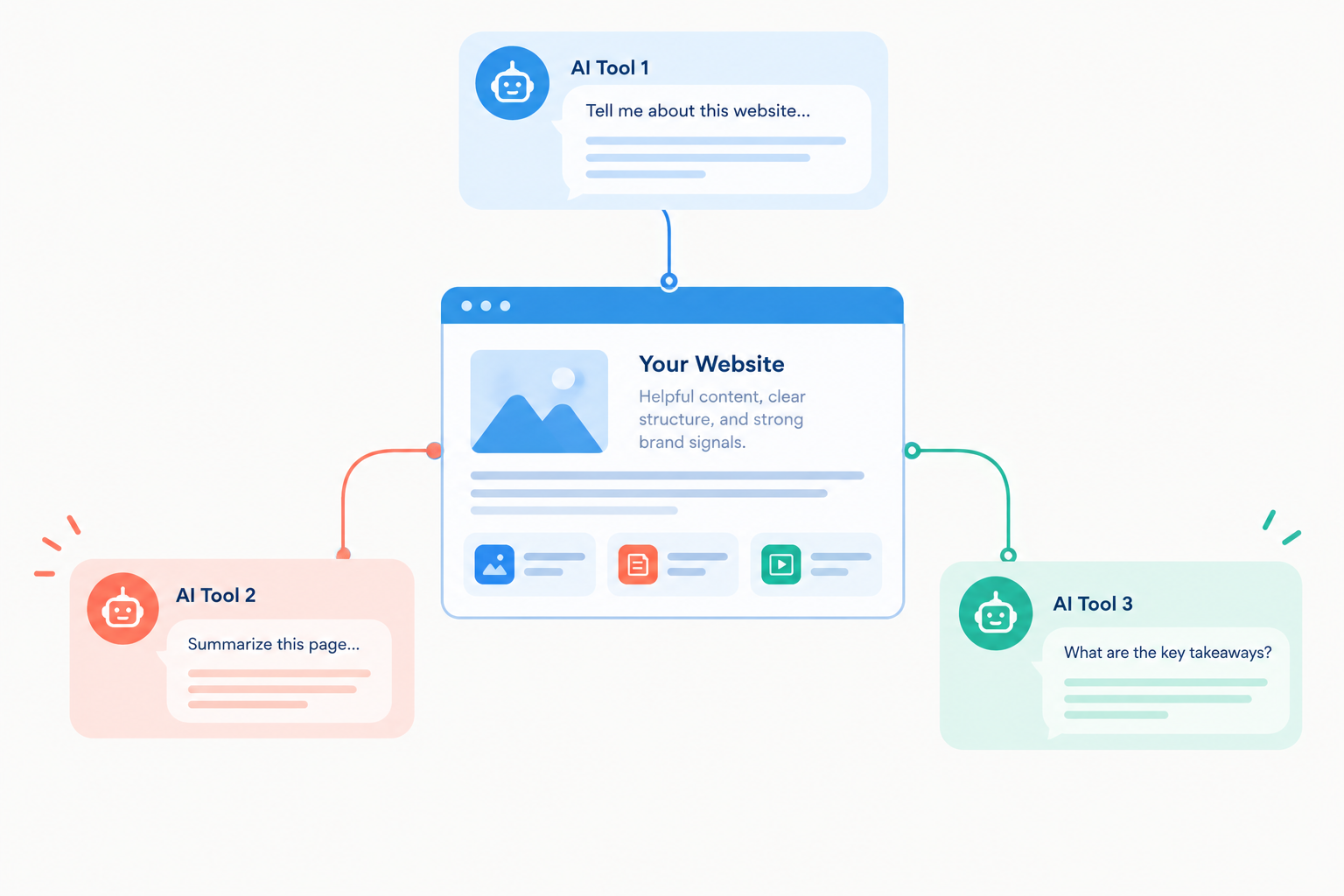
More customers now ask ChatGPT, Gemini, and other AI tools for recommendations and explanations before they ever visit a website. If those tools cannot reach your pages, cannot read them, or cannot tell what your business offers, you are left out of the answer. Many site owners respond by hunting for a secret setting. In reality, most of the work is ordinary website readiness, plus a few platform-specific switches that are worth knowing.
This guide shows you how to optimize your website for AI search, with separate sections for ChatGPT, Gemini and Google’s AI features, and other AI search tools. It sticks to what the platforms document and flags what is still guesswork. No tactic here can guarantee that a particular tool will mention or cite your site.
To optimize your website for AI search, make sure the right crawlers can access your pages, keep important text readable in the page itself, answer real customer questions clearly with evidence, keep your business facts consistent everywhere, and track results. ChatGPT, Gemini, and other tools each have their own crawler or control settings, but the foundations are shared.
Read our guide on Generative Engine Optimization
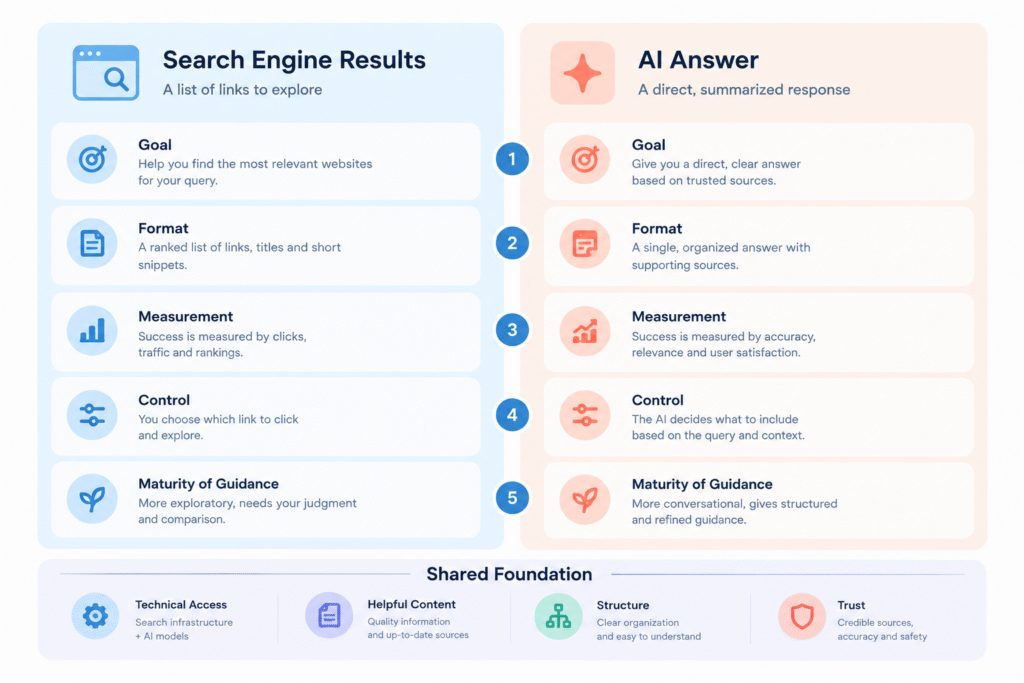
How ChatGPT, Gemini, and Other AI Search Tools Differ
Before changing anything, it helps to see how the main platforms differ in what they document and what you control.
| Platform | How a site gets included (as documented) | Main controls | Tracking |
|---|---|---|---|
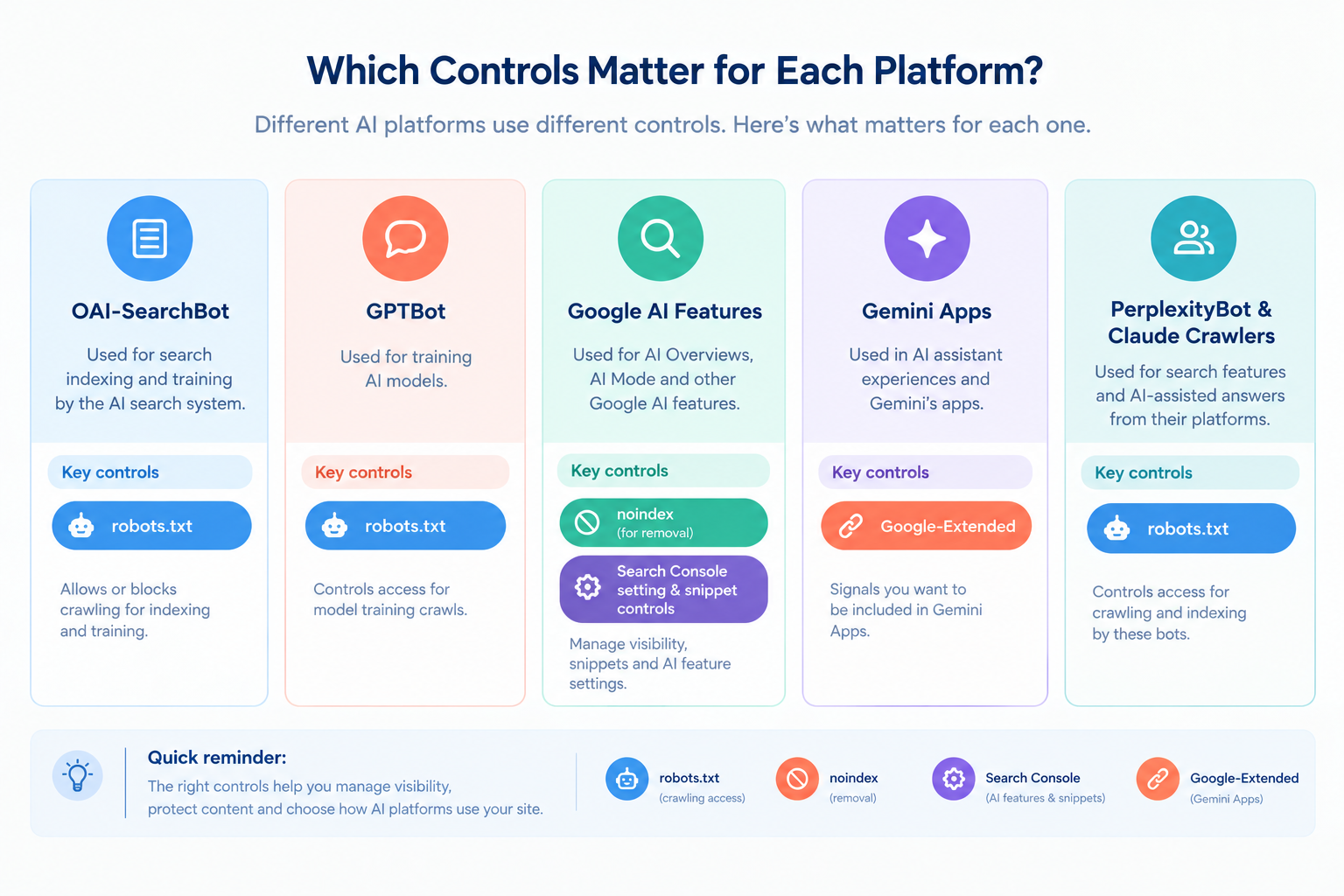
| ChatGPT search | OpenAI says any public website can appear. Allow OAI-SearchBot so content can be included in summaries and snippets. | robots.txt for OAI-SearchBot and GPTBot, noindex meta tag | Referral URLs include utm_source=chatgpt.com |
| Google AI Overviews and AI Mode | Page must be indexed and eligible to show with a snippet. Google says no extra requirements or special optimizations are needed. | Search Console setting, snippet controls (nosnippet, data-nosnippet, max-snippet, noindex) | Search Console Generative AI performance report |
| Gemini app | No separate optimization guide was found. Google-Extended is reported to manage whether sites help improve Gemini Apps. | Google-Extended robots.txt token | No dedicated report verified |
| Perplexity | PerplexityBot surfaces and links websites in Perplexity search results. | robots.txt for PerplexityBot | No verified referrer standard |
| Claude | Claude-SearchBot helps improve search result quality. Claude-User accesses sites when users ask. | robots.txt for Claude-SearchBot, ClaudeBot, Claude-User | No verified referrer standard |
The takeaway is that platform-specific work is small. The larger job is making your site accessible, readable, and credible for all of them.
Step Zero: Audit Your Website’s AI Readiness
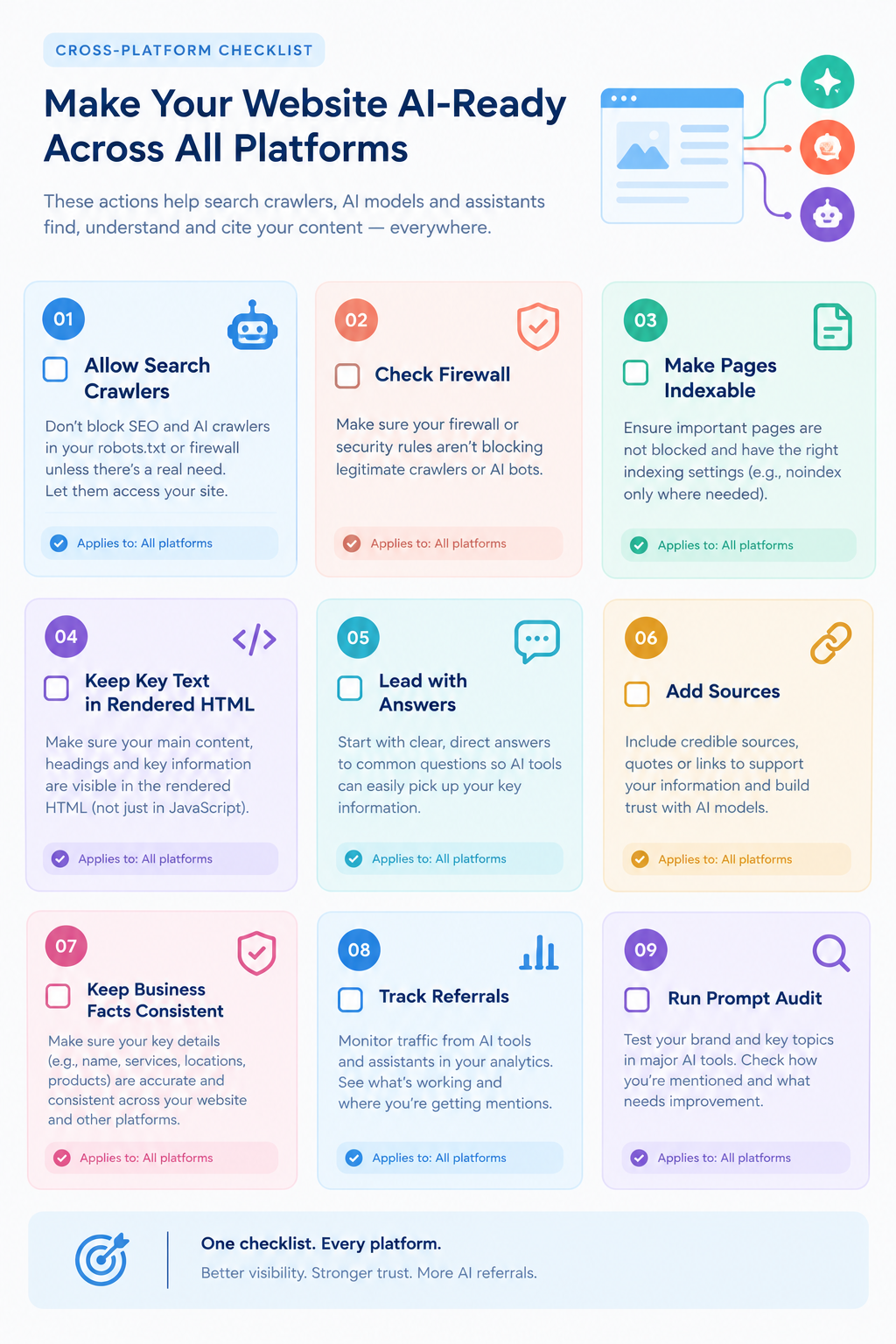
Start with an audit. Each item below can silently block AI visibility, and each is cheap to check. This section covers site-wide readiness that applies to every platform.
| Check | Why it matters | How to check |
|---|---|---|
| Indexing and snippet eligibility | Google says a page must be indexed and eligible to show with a snippet to appear in its generative AI features. | Search Console URL inspection and page indexing report |
| robots.txt rules | A blanket disallow can block search crawlers you want, such as OAI-SearchBot. | Open yourdomain.com/robots.txt and read each user-agent block |
| Firewall and bot protection | Security tools may block AI crawlers even when robots.txt allows them. | Review your CDN or security settings and server logs |
| Rendering of key content | Content that only appears after heavy JavaScript may be missed. | View the rendered HTML in Search Console URL inspection |
| Noindex tags | A stray noindex removes a page from search results. | Crawl the site and filter for noindex directives |
| Canonical tags | Wrong canonicals can send signals to the wrong URL. | Crawl and compare canonical to the page URL |
| Internal links | Google lists making content easily findable through internal links as a technical point for AI features. | Check that key pages are linked from navigation or related content |
| Mobile and page experience | Google recommends a good page experience across devices. | Test key pages on a phone and in PageSpeed Insights |
| Analytics setup | You need to see AI referral traffic. | Confirm Google Analytics or your tool captures referrer and UTM data |
Indexing is never guaranteed, even when every requirement is met. Google says this explicitly. An audit raises your eligibility, it does not guarantee results.
How to Optimize Your Website for ChatGPT
OpenAI publishes a publishers and developers FAQ and a crawler overview. Together they give a clear picture of what site owners can do.
1. Allow OAI-SearchBot
OpenAI’s FAQ says any public website can appear in ChatGPT search, and that to have content included in summaries and snippets you should not block OAI-SearchBot. Depending on your current file, you may need to update robots.txt to allow it. OpenAI’s crawler overview adds that you should allow requests from its published IP ranges, and that robots.txt changes can take about 24 hours to take effect for search.
An illustration of a robots.txt that allows OpenAI’s search crawler looks like this:
User-agent: OAI-SearchBot
Allow: /
This is an example of syntax, not a recommendation for your site. Check your current file, and read OpenAI’s crawler overview and its publishers and developers FAQ before changing it.
2. Decide separately about GPTBot
OpenAI says each crawler setting is independent. A site can allow OAI-SearchBot so it can appear in search while disallowing GPTBot to indicate that content should not be used in training OpenAI’s generative AI foundation models. The FAQ says publishers who want to be excluded from potential training should block the GPTBot user agent.
Whether to allow training crawlers is a business decision with legal, licensing, and brand dimensions. It does not need to be tied to whether you want to appear in ChatGPT search.
3. Understand the difference between robots.txt and noindex
A subtle point from OpenAI’s FAQ: if a page is disallowed in robots.txt but OpenAI learns of its URL from a third-party search provider or by crawling other pages, and it seems relevant to a query, ChatGPT may show only the link and page title. To prevent that, use the noindex meta tag. The FAQ notes that the crawler must be allowed to crawl the page in order to read the tag.
In plain terms: if you want a page fully out of ChatGPT search, blocking it in robots.txt alone may not be enough. Use noindex, and leave the page crawlable so the tag can be read. If you want a page included, do not disallow it and do not noindex it.
4. Track ChatGPT referrals
OpenAI’s FAQ says ChatGPT adds utm_source=chatgpt.com to referral URLs, so publishers that allow OAI-SearchBot can track this traffic in tools such as Google Analytics. In your analytics, filter sessions by that source to see which pages ChatGPT sends visitors to and how those visitors behave.
Two cautions. First, a visit that arrives through a different path, such as someone copying a URL from an answer, will not carry the parameter. Second, referral counts show visits, not mentions, so they understate how often you are named without a click.
5. Make the page itself useful
OpenAI’s documents focus on access and controls rather than ranking factors, so there is no official list of ways to rank in ChatGPT search. What remains is general content quality: clear answers, named sources, original detail, and consistent facts, as covered later in this guide.
6. Consider ChatGPT Atlas and accessibility
OpenAI’s FAQ says its Atlas browser interprets page structure using ARIA labels, and that following WAI-ARIA best practices for interactive elements can improve compatibility. This is useful beyond ChatGPT: accessible markup also helps screen reader users and other automated visitors.
How to Optimize Your Website for Gemini and Google’s AI Features
Google’s published guidance concerns its generative AI features in Search, namely AI Overviews and AI Mode. No separate optimization guide for the Gemini app itself was found, so this section covers what Google documents and then the Gemini-specific control.
1. Treat it as SEO
Google’s guide, published in May 2026, says best practices for SEO remain relevant because its generative AI features are rooted in its core Search ranking and quality systems. The AI features documentation adds that there are no additional requirements to appear in AI Overviews or AI Mode, and no other special optimizations necessary. If you are weighing “GEO” advice for Google, Google suggests reviewing its guidance on evaluating third-party SEO advice.
2. Meet the eligibility requirements
To be eligible to show in generative AI features in Google Search, a page must be indexed and eligible to be shown in Google Search with a snippet. Google’s guide also says a site must be included in generative AI features in Search Console to be eligible for display. Search Engine Land reported that Google added a toggle for opting out and that opted-out sites receive no traffic or impressions from those features. Check your property’s setting.
3. Use the technical points Google lists
Google’s AI features documentation lists several practical items:
- Make content easy to find through internal links on your website.
- Support text with high-quality images and videos where applicable. Google says AI features can bring in relevant images and video.
- Make structured data match the visible text on the page. Structured data is not required for generative AI search, and no special markup is needed.
- Keep Merchant Center and Business Profile information up to date.
4. Cover the follow-up questions
Google says its AI features may use query fan-out, issuing multiple related searches across subtopics. A page that answers the main question and its natural follow-ups gives the system more useful material. Google also says that creating separate pages for each variation primarily to manipulate rankings or AI responses violates its scaled content abuse policy, so keep this to depth on one page.
5. Know what Google-Extended does
Google-Extended is a robots.txt product token related to Gemini. Search Engine Roundtable reported in February 2024 that Google described it as a way for publishers to manage whether their sites help improve Gemini Apps and Vertex AI generative APIs, and that Google’s documentation states it does not impact a site’s inclusion or ranking in Google Search. The same report says it does not control what Google’s AI search features show.
That report is from 2024, and Google’s crawler documentation changes. Confirm current wording in Google’s own documentation before acting. The practical point is that blocking Google-Extended is a separate decision from appearing in Search or in AI Overviews, which depend on Search eligibility and the Search Console setting.
6. Measure with Search Console
Google’s guide points to the Generative AI performance report in Search Console as the way to see how content performs in its AI features on Search and Discover. It also says sites appearing in AI features are included in overall Search Console traffic. Be wary of third-party tools that claim to use internal Google metrics, because Google says none has access to its internal ranking or AI systems.
Optimizing for Perplexity, Claude, and Other AI Search Tools
Other tools have their own crawlers and less public detail. These facts come from the vendors’ own documentation, read for this guide:
| Crawler | Operator | Documented purpose | Note |
|---|---|---|---|
| PerplexityBot | Perplexity | Surfaces and links websites in Perplexity search results | Perplexity says it is not used to crawl content for AI foundation models and recommends allowing it in robots.txt |
| Perplexity-User | Perplexity | Supports user actions within Perplexity | Perplexity says it generally ignores robots.txt rules because a user requested the fetch |
| Claude-SearchBot | Anthropic | Navigates the web to improve search result quality | Anthropic says blocking it may reduce visibility and accuracy in user search results |
| Claude-User | Anthropic | Accesses sites when Claude users ask questions | Anthropic says blocking it may reduce visibility for user-directed web search |
| ClaudeBot | Anthropic | Collects content that could contribute to training | Disabling signals exclusion from future training datasets |
Details are in Perplexity’s crawler documentation and Anthropic’s crawler help article. Microsoft’s Copilot and Bing were not verified for this guide. Search Engine Land has reported that Microsoft was testing an AI Performance report in Bing Webmaster Tools, described in January 2026 as a limited beta, so check your own account for current availability.
The pattern across vendors is consistent. Separate crawlers handle search, training, and user-initiated fetches. Allowing the search crawlers is generally what makes appearing in that tool possible, and training is a separate choice.
Content Optimizations That Work Across Platforms
Once access is sorted, the content work is shared. None of it requires a special format for AI.
Lead with the answer
Put a direct answer in the first two or three sentences under each question-style heading, then add detail, examples, and limits. It serves people scanning on a phone and any system extracting a passage. Google says there is no requirement to chunk content into tiny pieces and no ideal page length, so write for the reader.
Publish non-commodity content
Google’s guide says unique, compelling, useful content will likely influence your presence in generative AI search more than any other suggestion in the guide. It contrasts generic tip lists with content that has a distinct expert or experienced view. Add original data, first-hand experience, and named sources with dates.
The original GEO research, per secondary summaries, found that statistics, quotations, and citations tended to help visibility, while keyword stuffing did not. The reported “up to 40%” is a research ceiling, not a forecast. Check the paper for method details.
Keep business facts consistent
AI tools summarize what they find across many places. Use one spelling of your name, one description per service, matching prices, and the same address and hours on your site, Google Business Profile, and directory listings. Google says Merchant Center and Business Profile information can help products and local services appear in AI responses and other results.
Read Our Guide on what LLM SEO means
Show real authorship and credibility
Name the author, show verifiable credentials, and link to a clear About page. AI answers can reflect what is said about a brand across the web, including in blogs, videos, and forums, so genuine reviews and coverage help. Google cautions that chasing inauthentic mentions is not as helpful as it seems.
Use images, video, and diagrams
Add original visuals that explain something, with descriptive alt text. Google says supporting text with high-quality images and videos creates more opportunities to appear beyond a standard web page link.
Technical Checklist for AI Search Readiness
| Area | Action | Applies to |
|---|---|---|
| Access | Allow search crawlers you want (for example OAI-SearchBot, PerplexityBot, Claude-SearchBot) in robots.txt, and check firewall rules | ChatGPT, Perplexity, Claude |
| Indexing | Make key pages indexable and snippet-eligible, and fix stray noindex tags | Google AI features, ChatGPT |
| Search Console | Verify the site, confirm the generative AI setting, review the Generative AI performance report | Google AI features |
| Rendering | Ensure key text is present in the rendered page, not hidden behind blocked scripts | All |
| Internal links | Link key pages from navigation and related content | Google AI features, all |
| Structured data | Add only where it accurately matches visible text, as part of normal SEO | Google rich results, all |
| Accessibility | Use semantic HTML and follow WAI-ARIA best practices for interactive elements | ChatGPT Atlas, agents, screen readers |
| Business data | Keep Business Profile and Merchant Center current | Google AI features |
| Analytics | Track utm_source=chatgpt.com and AI referrers in your own data | ChatGPT and others |
Prepare Your Website for AI Agents
AI tools increasingly act, not just answer. Google’s guide describes AI agents as autonomous systems that can perform tasks such as booking a reservation or comparing product specifications, and says browser agents may gather data by analyzing screenshots, inspecting the DOM structure, and interpreting the accessibility tree.
If bookings, quotes, or purchases are part of your business, the practical implications are simple:
- Use semantic HTML so headings, buttons, and forms are identifiable.
- Label interactive elements clearly, following WAI-ARIA best practices, which OpenAI also recommends for Atlas.
- Keep forms and flows simple, with visible labels and predictable steps.
- State key facts in text, such as prices, availability, and policies, not only inside images.
Google points to its agent-friendly website guidance on web.dev and mentions emerging protocols such as the Universal Commerce Protocol. This area is evolving, so treat it as a watch item, not a rebuild.
How to Measure Results
Combine three sources so that no single noisy number misleads you.
| Source | What it shows | Limits |
|---|---|---|
| Search Console Generative AI performance report | How your content performs in Google AI features | Google only |
| Analytics (utm_source=chatgpt.com and other AI referrers) | Visits and behavior from AI tools | Misses mentions without clicks. Build your referrer list from your own data. |
| Prompt audit | Whether your brand is mentioned or cited, accuracy, and competitors named | Answers vary between runs, so track trends |
Run a monthly prompt audit
- Write 20 to 30 prompts a customer might use, covering definitions, comparisons, and “best for” questions.
- Run them in ChatGPT, Gemini, and any other tool your audience uses, and log the date and tool.
- Record whether you are mentioned or cited, whether the answer is accurate, and which competitors appear.
- Repeat monthly and compare trends, not single results.
- Correct inaccuracies by clarifying your own pages first, then strengthening trustworthy third-party coverage.
A simple citation rate is prompts where your pages were cited divided by prompts tested. This is a suggested internal metric, not an industry standard.
What to Do When an AI Tool Gets Your Business Wrong
Sooner or later a prompt audit will show an answer that misstates your pricing, your services, or your location. A calm, ordered response works better than a rushed one.
- Record it. Save the prompt, the tool, the date, and the full answer. Answers vary between runs, so rerun the prompt a few times before drawing conclusions.
- Check your own pages first. Look for outdated figures, conflicting descriptions, or facts that appear only inside images or scripts. Fix those and make the correct fact easy to find in plain text.
- Check your profiles and listings. Align your Business Profile, product feeds, and directory entries with the corrected facts.
- Look for third-party sources. If an outdated review or article contains the wrong detail, ask the publisher to correct it where that is realistic.
- Use the platform’s own feedback tools where they exist, and keep expectations modest. Platforms do not promise to change a specific answer.
Then rerun the audit after a few weeks and see whether the answer has shifted. Treat any improvement as a trend to confirm, not proof that a single action caused it.
Where to Focus by Business Type
These are judgment-based suggestions, not measured results. Your own analytics and prompt audits should override them.
| Business type | Highest-value focus | Platform most likely to matter first |
|---|---|---|
| Local service business | Business Profile accuracy, clear service and pricing pages, reviews | Google AI features, then ChatGPT |
| Ecommerce store | Product data as text, Merchant Center feeds, buying guides | Google AI features, then ChatGPT |
| B2B software or services | Comparison pages, original data, expert explainers, prompt audits | Test all of them. Ask customers which tools they use. |
| Publisher or blog | Crawler policy decisions, clear authorship, original reporting | Depends on your licensing stance |
| Agency or consultancy | Shared audit template, honest reporting separated by platform | Depends on each client |
Which platform matters first is an empirical question. Ask customers where they research, check your referral data, and run the audit. Do not assume that the platform with the loudest coverage is the one your buyers use.
A 30-Day Action Plan
Week 1: Audit and access
- Run the AI readiness audit table above.
- Review robots.txt and firewall settings for search crawlers.
- Confirm Search Console verification and the generative AI setting.
- Confirm analytics will capture utm_source=chatgpt.com.
Week 2: Baseline
- Write your prompt list and run the first audit.
- Record Search Console clicks and impressions, and conversions.
- Check your Business Profile, product feeds, and directory listings for consistency.
Week 3: Improve key pages
- Rewrite your top five pages to lead with direct answers.
- Add named sources, dates, and author details.
- Add one original diagram or checklist per page, with alt text.
- Fix accessibility issues on key forms and buttons.
Week 4: Review
- Rerun the prompt audit and compare it with the baseline.
- Review the Search Console report and analytics for AI referrals.
- Decide your next quarter’s priorities based on what the data shows.
Myths and Common Mistakes
Google’s guide lists several tactics it says you can ignore for Google Search. They show up often in advice about ChatGPT and Gemini:
- llms.txt files and special markup. Google Search does not use them, and they neither help nor harm Google visibility. No verified evidence of benefit was found for other platforms.
- Chunking content into tiny pieces for AI.
- Rewriting only for AI, since systems understand synonyms and meaning.
- Seeking inauthentic mentions.
- Over-focusing on structured data.
Other mistakes to avoid:
- Blocking AI search crawlers by accident through a blanket robots.txt rule or firewall setting.
- Using robots.txt as a removal tool. OpenAI says a disallowed page can still appear as a link and title, so use noindex where removal is the goal.
- Confusing Google-Extended with Search eligibility. They are separate.
- Expecting guarantees. No technique ensures a mention or citation in ChatGPT, Gemini, or anywhere else.
- Publishing AI-generated filler. Google says content created with generative AI tools must still meet Search Essentials and spam policies.
- Skipping a baseline. Without one, you cannot interpret later changes.
Worked Example (Illustrative)
This is a hypothetical scenario, not a client case study.
A regional online furniture retailer asks ChatGPT and Gemini for “best sofas for small apartments” and rarely sees its brand named. The team starts with the audit.
It finds that its CDN security rules challenge unknown bots, which may be blocking search crawlers, so it reviews the rules and allows the search crawlers it wants. It confirms robots.txt has no blanket disallow. It sees that product dimensions appear only inside images, so it adds them as text. It finds inconsistent product names between the site and its feed, and aligns them.
It then rewrites its small-apartment buying guide to open with a direct answer, adds measured dimensions and a named source for any claim, adds an original diagram of space planning, and sets up tracking for utm_source=chatgpt.com. It runs a 25-prompt audit before changes and again after 60 days.
No outcome is promised. Every action is something the team can verify and justify, and each also helps ordinary search and human shoppers.
Frequently Asked Questions
How do I get my website into ChatGPT search?
OpenAI says any public website can appear in ChatGPT search. Do not block OAI-SearchBot in robots.txt, allow its published IP ranges, and avoid noindex on pages you want included. OpenAI does not guarantee inclusion or ranking, so measure your own results.
How do I optimize my website for Gemini?
Google’s published guidance covers AI Overviews and AI Mode in Search. Make pages indexed and snippet-eligible, keep the Search Console setting on, and follow standard SEO. No separate Gemini app optimization guide was found, and Google-Extended is a separate control.
Read more on this: how GEO and SEO differ
Should I block GPTBot?
It depends on your goals. OpenAI says GPTBot is controlled separately from OAI-SearchBot, so you can allow search and decline training. Blocking GPTBot signals content should not be used for training. Consider legal and licensing needs, not just visibility.
Does blocking Google-Extended affect my Google rankings?
Google’s documentation, as reported by Search Engine Roundtable in 2024, says Google-Extended does not impact inclusion or ranking in Google Search. Confirm the current wording in Google’s documentation before changing your robots.txt.
How can I track traffic from ChatGPT?
OpenAI says ChatGPT adds utm_source=chatgpt.com to referral URLs, so you can filter for it in tools like Google Analytics. It captures visits, not mentions, so also run a monthly prompt audit to see how often you are named.
Do I need llms.txt to appear in AI search?
No evidence supports that. Google says Google Search does not use llms.txt, and no verified evidence of a benefit was found for other platforms. It is optional and low priority compared with crawler access, quality content, and measurement.
Is optimizing for ChatGPT different from optimizing for Google?
Partly. The foundations are shared: access, helpful content, and credibility. The switches differ, such as OAI-SearchBot and utm_source=chatgpt.com for ChatGPT, and Search Console settings and the Generative AI report for Google.
Can any tactic guarantee my site appears in AI answers?
No. None of the platforms promise inclusion, and answers vary between runs. You can improve access, usefulness, and credibility, then track results. Be cautious of any provider who guarantees mentions or citations.
Conclusion
Optimizing your website for ChatGPT, Gemini, and AI search is less mysterious than the marketing suggests. Make sure the right crawlers can reach your pages, keep important content readable, write clear and evidence-backed answers, keep your business facts consistent, and measure what happens. The platform-specific switches are few and documented, and the rest is the same quality work that helps people and search engines.
Start this week with the audit table and your robots.txt and firewall review, then run a baseline prompt audit. Those steps are inexpensive, and they tell you where to invest next.