

You have improved your pages, checked your crawler settings, and started earning mentions. Now someone asks the obvious question: is it working? In traditional SEO, a rank tracker and Search Console would answer that. In AI search, there is no single report that shows everything, and some of the numbers people quote are weaker than they look.
This guide shows you how to track your website visibility in AI search with the data that actually exists. It covers Google’s Search Console report, Bing’s AI Performance report, analytics, server logs, and manual prompt audits, along with what each one can and cannot tell you. It ends with a one-page dashboard and a 30-day setup plan.
To track your website visibility in AI search, combine four sources: Search Console’s Generative AI performance report for Google features, analytics for AI referral visits, server logs to confirm crawler access, and a repeated prompt audit for mentions and accuracy. No single tool shows everything, so read the results as trends, not exact counts.

What “AI Search Visibility” Actually Means
The phrase gets used for several different things. Separating them prevents a lot of confusion, because each layer has its own data source and its own blind spots.
| Layer | Question it answers | Main data source | Reliability |
|---|---|---|---|
| Access | Can AI tools reach and use my pages? | Server logs, robots.txt and firewall review, Search Console indexing | High for crawl facts |
| Presence | Am I shown, cited, or mentioned in answers? | Search Console AI report, Bing AI Performance report, prompt audits | Medium. Varies by tool. |
| Traffic | Do AI tools send me visits? | Analytics referral data | Medium. Some traffic is misclassified or missing. |
| Outcomes | Do those visits lead to results? | Analytics conversions | Medium to high once traffic is identified |
| Accuracy | Is what AI says about me correct? | Prompt audits | Manual and variable |
Presence is the hardest to measure, because an AI tool can name you without sending a visit. Traffic is easier to count, but it only captures people who clicked. Tracking both, and comparing them, gives a more honest picture than either alone.
What You Can and Cannot Measure
Before building a dashboard, set expectations. These limits apply no matter which tool you use.
- There is no universal report. Google and Microsoft offer first-party reports for their own features. OpenAI, Perplexity, Anthropic, and others do not offer site owners an equivalent report that was found for this guide.
- Answers vary between runs. The same prompt can produce different brands, sources, and wording. One snapshot is not a result.
- Mentions without clicks are invisible to analytics. Traffic reports understate how often you are named.
- Some AI traffic lands in the wrong bucket. As explained below, apps and in-app browsers can show up as Direct or Unassigned.
- Third-party tools cannot see inside the platforms. Google says no third-party tool has access to its internal ranking or AI systems.
None of this is a reason to skip tracking. It is a reason to track several things, record your method, and look at trends over months.

Method 1: Google Search Console’s Generative AI Performance Report
For Google’s own AI features, this is the closest thing to official data. Google’s help page for the report says it shows how many times links to your site were shown in a generative AI feature on Google Search, and that the report covers AI Overviews and AI Mode. It is where to start. The report is documented in Google’s Search Console help, and Google’s generative AI guide recommends using it to measure visibility in these features.
What the report shows
| Element | What Google documents |
|---|---|
| Metric | Impressions: how many times links to your site were shown in a generative AI feature on Google Search |
| Pages tab | Final URL after redirects, assigned to the canonical URL |
| Countries tab | Where the search originated |
| Dates tab | Days, weeks, or months, in Pacific Time |
| Devices tab | Desktop, tablet, or mobile |
| Search type filter | Web: text-based queries. Web: multimodal, such as Google Lens, Circle to Search, uploaded images, and Chrome image search. |
| Surfaces covered | AI Overviews and AI Mode. Google Discover is not included and has its own generative AI report. Search Labs experiments are excluded. |
Google’s page says these insights were available for all websites worldwide as of August 31, 2026. Open the report from the performance section of Search Console, and check Google’s page for the current location.
How the numbers are counted
Two details change how you should read the charts:
- Chart totals are aggregated by property. If several results from your site appear in one AI feature response, that counts as one impression. Adding a URL filter aggregates the chart by URL.
- Table totals depend on the tab. Pages are aggregated by page, while countries, devices, and dates are aggregated by property. Chart and table totals can therefore differ, which is expected and not an error.
Limits and caveats
- The report may not appear if your site has too few generative AI impressions, or if it has been excluded from Search generative AI features.
- The usual Search performance limits apply, including a 1,000-row table limit.
- Recent data may be preliminary and can change within a few hours.
- In exports, values shown as “~” or “-” download as zeros, so check exports before charting small numbers.
- The page defines impressions as its metric. Check your own property for any other metrics the report offers, since reports can change.
How to use it well
- Find which pages appear. Sort the Pages tab and note which pages and topics show up in AI features. These are your current strengths.
- Compare with regular search. Place the AI report next to the ordinary Search performance report for the same pages. A page with strong web impressions and no AI impressions is worth investigating for content or eligibility issues.
- Watch the multimodal filter. If image-based searches matter to your business, compare text and multimodal results.
- Annotate changes. Record dates when you publish or rewrite pages, so a rise or fall can be linked to an action or ruled out.
- Check eligibility if the report is missing. Confirm that your site is not excluded from generative AI features in Search Console, and that key pages are indexed and snippet-eligible. Search Engine Land has reported that Google added a setting to opt out and that opted-out sites receive no traffic or impressions from those features.
Method 2: Bing Webmaster Tools AI Performance Report
Microsoft has its own first-party report. Koozai reported in February 2026 that Bing Webmaster Tools introduced AI Performance reporting, described as a public preview, covering Copilot, AI summaries, and selected partner integrations.
| Metric (as reported) | What it shows |
|---|---|
| Total citations | How often your site content is referenced in AI answers |
| Average cited pages | The number of unique pages cited daily |
| Grounding queries | The phrases AI uses to find and reference your content. The report notes these are generalized. |
| Page-level citation activity | Citation counts broken down by URL |
The same report states that this data is “not about clicks or rankings” and includes no traffic or engagement metrics. That makes it complementary to analytics, not a substitute. Because this was a preview in early 2026, verify the current status and metric names in your own Bing Webmaster Tools account.
If Copilot or Bing matters to your audience, the grounding queries are especially useful for content planning. They show how the system searches for material related to your pages.
Method 3: Analytics and Referral Traffic
Analytics shows the visits that AI tools send. It is the easiest layer to connect to business results, and also the layer most likely to mislead you if you trust default reports.
What the platforms document
OpenAI’s publisher FAQ says ChatGPT adds utm_source=chatgpt.com to referral URLs, so publishers that allow OAI-SearchBot can track this traffic in tools such as Google Analytics. Read the FAQ for the current wording. For other platforms, no equivalent documented parameter was found for this guide, so rely on what appears in your own data.
Why default GA4 reports can undercount
A July 2026 Search Engine Journal article reported that Google added an AI Assistant channel to GA4’s Default Channel Group on May 13, 2026, rolling out gradually to most properties by early June. According to the author, who based this on his own review of one GA4 account rather than a systematic study:
- Traffic from one AI source was split across three channels: AI Assistant, Referral, and Unassigned, depending on how the session was tagged.
- Perplexity was not on Google’s list of recognized assistants at the time and landed in Referral.
- Sessions with no readable referrer, such as some app and in-app browser visits, landed in Direct.
- Google AI Overviews and AI Mode traffic was counted as Organic Search.
- Comparing a period that spans the channel’s rollout with one that does not can create an artificial trend.
This is one practitioner’s account, and GA4’s behavior and platform lists change. Treat the specifics as a prompt to check your own property, not as settled fact.
How to set up tracking you can trust
- Look at raw sources first. In your acquisition reports, list sessions by source and look for AI tools. Note every domain that appears, since your list will differ from any generic one.
- Build a custom channel group. Create a channel that groups AI sources by matching on the source field, and place it above Referral and Organic so it takes priority. Menu names in analytics tools change, so follow the current help documentation for custom channel groups.
- Use a careful pattern. Match full domains, not short fragments. The author of the article above warns that bare tokens can produce false positives.
- Annotate the rollout. Mark the date GA4 introduced or changed AI classification in your property, and avoid comparing across it without adjustment.
- Review quarterly. Platforms and domains change, so revisit your list every few months.
The following pattern is illustrative only. Replace it with the domains that appear in your own data:
(^|\.)(chatgpt\.com|perplexity\.ai|gemini\.google\.com|copilot\.microsoft\.com|claude\.ai)$
A custom channel changes how traffic is classified. It does not recover traffic that arrives with no readable source, so a share of AI-driven visits will remain in Direct. Treat your AI referral number as a floor, not a total.
What to look at once traffic is identified
- Landing pages. Which pages do AI visitors arrive on? Compare with pages that appear in the Search Console AI report.
- Engagement and conversions. Do AI visitors behave differently from organic visitors? Compare on the same pages and time periods.
- Assisted effects. Watch branded search and direct visits for lift after you gain visibility. This is indirect and hard to prove, so label it as a signal.
Method 4: Server Logs for Crawler Activity
Logs answer the access question with facts. They show which crawlers requested which pages, and when. They do not show whether those pages were used in any answer, so treat crawl activity as eligibility evidence, not visibility.
| Crawler | Operator | Documented purpose |
|---|---|---|
| Googlebot | Search indexing, which Google AI features draw from | |
| OAI-SearchBot | OpenAI | Surfaces websites in ChatGPT search results |
| GPTBot | OpenAI | Training-related crawling |
| ChatGPT-User | OpenAI | Fetches pages when a user asks |
| PerplexityBot | Perplexity | Surfaces and links websites in Perplexity search results |
| Perplexity-User | Perplexity | Supports user actions within Perplexity |
| Claude-SearchBot | Anthropic | Navigates the web to improve search result quality |
| Claude-User | Anthropic | Accesses sites when Claude users ask questions |
| ClaudeBot | Anthropic | Collects content that could contribute to training |
For purposes and controls, see our guide to optimizing your website for ChatGPT, Gemini and AI search
Verify before you trust a log line
A user-agent string is just text that a request claims. Google’s documentation recommends verifying crawlers with a reverse DNS lookup followed by a forward lookup, or by matching the requesting IP against its published IP range lists, which is useful when others claim to be Google. OpenAI similarly publishes IP ranges for OAI-SearchBot and GPTBot, and its crawler overview recommends allowing requests from them. Use the published ranges before concluding that a visit was real.
What to look for
- Presence over time. Do the search crawlers you want to be indexed by appear in your logs? If a crawler never appears, check robots.txt, firewall rules, and bot protection.
- Response codes. Look for errors or challenges served to those crawlers, since an inappropriate HTTP response code can affect how your site appears in Google products.
- Page coverage. Check whether important pages are being requested, or only a few.
- Changes after edits. OpenAI notes robots.txt changes can take about a day to take effect for search, so compare logs before and after a change.
Not every host provides raw logs, and a content delivery network may log requests separately. If you cannot access logs, ask your host or CDN provider what reports exist.
Method 5: Prompt Audits
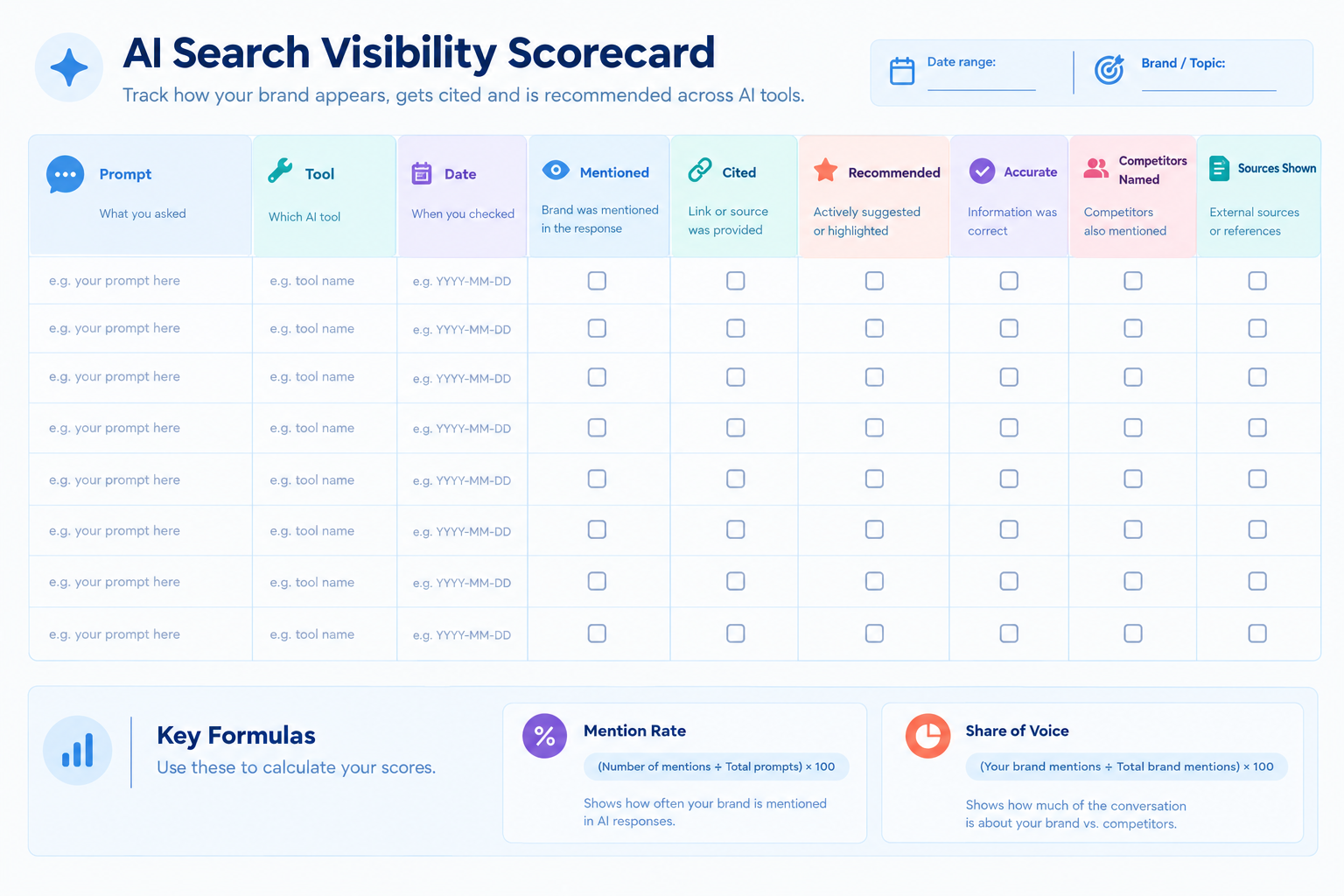
A prompt audit is the only method that tells you whether AI tools mention you, describe you accurately, and name your competitors. It is manual, imperfect, and essential.
Design the prompt set
| Prompt type | Example pattern | What it reveals |
|---|---|---|
| Category | “Best [category] for [audience]” | Whether you are in the consideration set |
| Problem | “How do I [solve the problem you solve]?” | Whether tools connect you to the problem |
| Comparison | “[Competitor] vs [Brand]” | How you are framed against rivals |
| Brand | “What is [Brand]?” | Accuracy and tone of descriptions |
| Alternative | “Alternatives to [Competitor]” | Whether you appear as an option |
Use 20 to 30 prompts that reflect how real customers ask, drawn from sales calls, support tickets, and Search Console queries. Keep the wording fixed between months so you compare like with like, and add new prompts in a separate set.
Read our complete guide on getting your brand mentioned in AI answers
Run the audit consistently
- Log the date, tool, and prompt text every time.
- Note whether you were logged in, and any personalization or memory settings, since these may change answers. This is a precaution, not a documented effect.
- Run important prompts several times and record each result.
- Record mention, citation, recommendation, accuracy, competitors named, and sources shown.
Measure your own noise first
Before reading any trend, find out how much your results move on their own. Run your baseline set three times in the same week and compare. If your mention rate swings by a few points between identical runs, then changes of that size later are noise, not progress.
This simple step prevents most false conclusions. A team that sees a rise from one run to the next and celebrates is often just seeing normal variation.
Metrics to calculate
| Metric | Formula | Note |
|---|---|---|
| Mention rate | Prompts where your brand is named divided by prompts tested | Suggested internal metric |
| Citation rate | Prompts where one of your pages is cited divided by prompts tested | Only where the tool shows sources |
| Recommendation rate | Prompts where you are actively recommended divided by prompts tested | Needs a clear scoring rule |
| Accuracy rate | Mentions with correct key facts divided by total mentions | Define “key facts” in advance |
| Share of voice | Your mentions divided by all brand mentions across the prompt set | Depends on your prompt list |
None of these is an industry standard. Their value is internal consistency: the same prompts, scoring rules, and tools every month.
Method 6: AI Visibility Tracking Tools
Software tools can run prompts at scale and log results, which saves time once your prompt set grows. They can also overpromise. Google’s guide cautions against third-party tools that promise ranking success or claim to use internal metrics, and notes that none has access to its internal ranking or AI systems. Use tools if they help your workflow, and judge their advice against official guidance.
When evaluating one, ask:
| Question | Why it matters |
|---|---|
| How does it collect answers, and from which AI tools? | Different collection methods can give different results from what a customer sees |
| How many prompts and how often? | Small or infrequent samples are noisy |
| Can you control and export the prompt set? | You need consistent prompts and your own copy of the data |
| Does it show sources and full answers? | You need to verify results and run source-gap analysis |
| Does it separate mention, citation, and recommendation? | They mean different things |
| What does it claim about internal platform data? | Claims of access to internal metrics are a warning sign |
| Can you reproduce a result manually? | A result you cannot reproduce is hard to trust |
Whatever you choose, spot-check the tool against manual runs on a sample of prompts before relying on its dashboards.
Build Your AI Visibility Dashboard
Put the four sources on one page so the team reads them together. One row per layer is enough.
| Layer | Metric | Source | Cadence |
|---|---|---|---|
| Access | Search crawler hits and error responses | Server logs | Monthly, plus after any robots.txt or firewall change |
| Access | Indexed key pages | Search Console | Monthly |
| Presence | Impressions in Google AI features | Search Console Generative AI report | Monthly |
| Presence | Citations and cited pages (if available) | Bing Webmaster Tools AI Performance | Monthly |
| Presence | Mention, citation, and recommendation rate | Prompt audit | Monthly |
| Traffic | AI referral sessions and landing pages | Analytics custom channel | Monthly |
| Outcomes | Conversions from AI referrals | Analytics | Monthly |
| Accuracy | Accuracy rate and notable errors | Prompt audit | Monthly |
Add a short notes column for every month: what you published, changed, or fixed. Without it, nobody will remember why a number moved.
How to Read What You See
Patterns across layers tell you where to look. These are working hypotheses to investigate, not conclusions.
| Pattern | Possible reading | What to check |
|---|---|---|
| Search crawler hits are zero | Access problem | robots.txt, firewall, bot protection, response codes |
| Search Console AI impressions are present, AI referral visits are low | You may be shown without being clicked, or traffic may be misclassified | Custom channel setup, Direct traffic, whether answers satisfy the question |
| Mention rate is rising, AI referrals are flat | You are named without clicks | Whether the answer links to you, and brand search and direct visits |
| AI referrals are rising, mention rate is flat | A few pages may drive most traffic, or the prompt set misses how people ask | Landing pages and prompt coverage |
| Mentions are accurate on your own pages but wrong in answers | Third-party sources may contain the wrong facts | Reviews, directories, and articles about you |
| A sudden change in a single run | Probably noise | Rerun, and compare with your measured noise band |
Common Tracking Mistakes
- Treating one run as proof. Answers vary, so repeat runs and compare trends.
- Trusting default analytics channels. Check where AI sources actually land in your property.
- Comparing across a classification change. A channel introduced mid-period can create a fake jump.
- Ignoring Direct and Unassigned. Some AI traffic lives there.
- Counting crawls as visibility. Crawler activity shows eligibility, not appearance in answers.
- Changing prompts every month. You lose the ability to compare.
- Relying on one tool. Cross-check with first-party reports and manual runs.
- Not recording changes. Without annotations, you cannot learn what worked.
- Chasing a single score. Different layers measure different things.
- Expecting guarantees. No technique ensures that any tool will mention or cite you.
Read more on What LLM SEO means
A 30-Day Setup Plan
Week 1: Access and first-party data
- Confirm your site is verified in Search Console and open the Generative AI performance report.
- Check whether your site is included in Search generative AI features.
- Review robots.txt and firewall rules for the search crawlers you want.
- Create a Bing Webmaster Tools account and check for the AI Performance report.
Week 2: Analytics
- List the AI sources that appear in your analytics.
- Build a custom channel group with a careful pattern.
- Annotate the date of any channel or settings change.
- Set up a report for AI landing pages and conversions.
Week 3: Logs and prompts
- Find out how to access raw server or CDN logs, and check for the crawlers listed above.
- Write your 20 to 30 prompts across the five types.
- Run the audit three times to measure your noise band.
Week 4: Dashboard and cadence
- Build the dashboard from the table above and record the baseline.
- Assign an owner and a monthly review date.
- Decide what you will do if a layer moves, such as who investigates an access drop.
Worked Example (Illustrative)
This is a hypothetical scenario, not a client case study.
A small B2B consultancy has published guides for a year and wants to know whether AI search is helping. It builds the four-source dashboard.
In Search Console, the Generative AI report shows impressions for several guide pages, but none for its pricing or comparison pages. In its logs, it sees the search crawlers it wants, but also finds that its bot protection is serving challenges to one of them. In analytics, its default reports show little AI traffic, but a custom channel reveals that most of it had been sitting in Referral and Unassigned.
The prompt audit shows the firm is mentioned for problem questions but rarely for comparison questions, and one tool describes its service area incorrectly. The team fixes the bot rule, corrects its service area text and listings, and writes honest comparison pages. It reruns its audit monthly, and only treats a change as real when it exceeds the swing it measured across three identical baseline runs.
No outcome is promised. The point is that each layer exposed a different problem, and no single report would have found all four.
Where to Focus by Business Type
These are judgment-based suggestions, not measured results.
| Business type | Start with | Watch for |
|---|---|---|
| Local service business | Search Console AI report, prompt audit for “near me” style prompts | Wrong hours or services in answers |
| Ecommerce store | Search Console, analytics landing pages and conversions, product accuracy | Misstated specs or prices |
| B2B software or services | All four sources, with a strong prompt audit on comparison questions | Competitors named in your place |
| Publisher or creator | Logs, analytics, and crawler policy review | Crawls without referrals |
| Agency or consultancy | A shared dashboard template and honest reporting by layer | Overstating a single metric to clients |
Frequently Asked Questions
What is AI search visibility?
AI search visibility is how often and how accurately your website and brand appear in AI-generated answers and links. It spans access, presence in answers, referral traffic, outcomes, and accuracy. No single report measures all of these, so tracking combines several sources.
Can I see AI Overviews and AI Mode data in Search Console?
Yes. Google’s Generative AI performance report shows impressions for links to your site in generative AI features, covering AI Overviews and AI Mode, with page, country, date, and device views. It may not appear if your site has too few impressions or is excluded.
Does GA4 track ChatGPT traffic?
Partly. OpenAI says ChatGPT adds utm_source=chatgpt.com to referral URLs. But a July 2026 report found AI sessions split across channels, so build a custom channel group and check your own data. Some visits arrive with no readable source and appear as Direct.
Why does my AI traffic show up as Direct?
Some AI apps and in-app browsers do not pass a readable referrer, so analytics cannot attribute the visit. A custom channel only reclassifies traffic that has a source. Treat your AI referral number as a floor, not a complete total.
How do I know whether AI crawlers visit my site?
Check server or CDN logs for the crawler names listed in vendor documentation, and verify them using reverse DNS or published IP ranges rather than user-agent text alone. Crawl activity shows access, not whether your pages appear in answers.
How often should I run a prompt audit?
Monthly is a practical cadence for most sites, with the same prompts each time. First run your baseline three times to measure natural variation, then treat changes smaller than that variation as noise.
Are AI visibility tracking tools accurate?
It depends on how they collect data, how many prompts they run, and how often. No third-party tool has access to Google’s internal systems. Spot-check any tool against manual runs, and use it as one input among several.
Can I track visibility in Gemini, Perplexity, or Claude?
For Google’s AI features in Search, use Search Console. No first-party report from Gemini’s app, Perplexity, or Claude was found for site owners, so rely on prompt audits, analytics referrals, and server logs.
Conclusion
Tracking AI search visibility is a matter of layering imperfect data honestly. Use Search Console’s Generative AI report and Bing’s AI Performance report for first-party presence, analytics for referral visits, logs for crawler access, and a consistent prompt audit for mentions and accuracy. Then read the results as trends against a measured noise band.
Start this week by opening the Generative AI performance report and writing your first 20 prompts. Those two actions give you one first-party data source and one baseline, which is enough to start learning.
Next step: “Read our complete guide to generative engine optimization“