How to Use ChatGPT for SEO Without Creating Generic AI Content
Most people who try ChatGPT for SEO start the same way: type “write a 1,500 word blog post about [topic],” read something that sounds fine, and publish. A week later, the page looks like every other page on the subject. It says what everyone says, in the order everyone says it, and it contains a few confident statements nobody checked.
The problem is not the tool. It is the job it was given. This guide shows how to use ChatGPT for SEO on tasks where it genuinely helps, how to feed it your own material so the output is specific, which tasks to keep away from it, and how to handle accuracy and data privacy. It includes prompt templates you can adapt. Nothing here guarantees rankings or citations, and every output needs a human check.
To use ChatGPT for SEO without creating generic content, give it narrow jobs and your own inputs: customer questions, data, notes, and constraints. Use it for structure, analysis of material you provide, editing, and technical helpers. Do not use it as a source of facts, keyword metrics, or finished articles. Verify everything, protect confidential data, and add the original information only you have.
Why ChatGPT Output Turns Generic
Understanding the cause makes the fix obvious. Two things are going on, and one of them comes from OpenAI itself.
1. It writes what is likely, and you asked for the average
Language models generate text by predicting what is likely to come next. A request like “write a blog post about X” has no information about your customers, your data, or your opinions, so the most likely response is a composite of what is commonly written on X. That is a reasoned explanation of the generic feel, not a quote from a source, but it matches what practitioners see. The more you supply, the further the output can move from the average.
2. It can state false things confidently
OpenAI’s September 2025 research post “Why language models hallucinate” defines hallucinations as plausible but false statements generated by language models. It explains that models are trained to predict text without true or false labels, that arbitrary low-frequency facts cannot be predicted from patterns alone, and that standard training and evaluation reward guessing over admitting uncertainty. OpenAI says newer models hallucinate less, especially when reasoning, but that they still occur.
For SEO, this matters in practice. A fabricated statistic, a wrong date, a nonexistent source, or an invented quote can slip into a draft in perfectly smooth prose. Google’s guidance says the same thing from the publisher’s side: models predict likely word sequences and may be inaccurate, so manual fact-checking of AI-generated content is critical.
The fix: change the job
Generic output comes from broad, ungrounded requests. Specific output comes from narrow jobs grounded in material you provide. The rest of this guide is a method for doing that.
Seven Rules Before You Start
- You supply the facts. Treat the model as a writer and analyst working from your notes, not as a researcher. Paste the data, quotes, and details you want used.
- You own every claim. Anything published has your name behind it. Verify against primary sources before it goes live.
- Give one job per prompt. “Cluster these queries” or “tighten this paragraph” works better than “do my SEO.”
- Ask for uncertainty. Tell it to flag anything it is not sure of and to leave placeholders instead of guessing.
- Keep metrics out of its hands. Do not ask it for search volume, keyword difficulty, rankings, or backlink counts. Get those from tools that measure them.
- Protect data. Decide what may be pasted into which account, using the privacy notes below.
- Log what you do. Keep the prompts, inputs, and checks with the page. It helps quality and shows how the content was made.
What ChatGPT Is Good For in SEO, and What It Is Not
The ratings below are judgment-based. They reflect how easy it is to check the output and how much damage a wrong answer can cause, not a measured performance score.
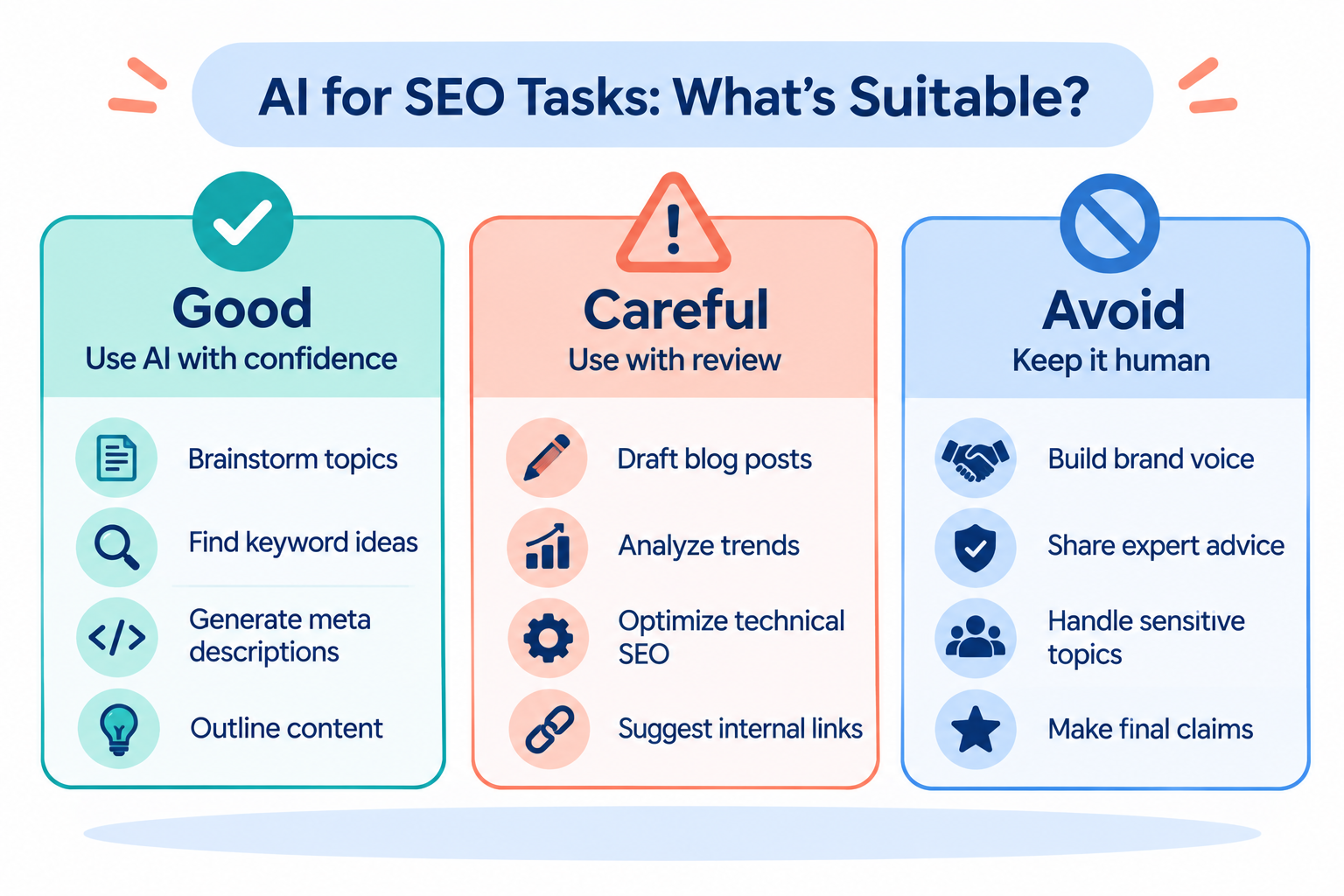
| SEO task | Suitability | Why | Check to make |
|---|---|---|---|
| Brainstorming topics and questions from your own notes | Good | Easy to judge, low risk | Compare with real customer questions |
| Clustering a keyword list you paste in | Good | Pattern work on supplied data | Review clusters against intent in live results |
| Building content briefs and outlines | Good | Structure, not facts | Cut sections that only restate common knowledge |
| Editing your own draft | Good | Facts and voice are yours | Make sure meaning did not change |
| Drafting title and meta description options | Good | Short and easy to review | Make sure each is accurate and unique |
| Regex, spreadsheet formulas, scripts for SEO chores | Good | Output can be tested | Test on a sample before full use |
| Drafting structured data | Careful | Syntax is easy to get subtly wrong | Validate with Google’s tools and match the visible page |
| Internal link suggestions from a list of pages | Careful | It may suggest weak or irrelevant links | Review each link for relevance |
| Summarizing competitor pages you paste in | Careful | Copyright and accuracy | Summarize ideas, do not copy text, verify points |
| Writing full articles from a one-line prompt | Avoid | Generic and unverified | Do not publish |
| Providing keyword volume, difficulty, or CPC | Avoid | It does not measure these | Use keyword tools |
| Reporting rankings or backlink data | Avoid | No reliable measurement | Use rank tracking and link tools |
| Citing sources, statistics, or quotes from memory | Avoid | Risk of fabrication | Find and open the primary source yourself |
| Giving legal, medical, or financial advice for publication | Avoid | High harm if wrong | Use qualified professionals |
The Input Pack: How to Make Output Specific
The single most useful habit is to assemble an input pack before you prompt. It is a short document you paste in at the start of a session. It carries everything that makes your page different from the average.
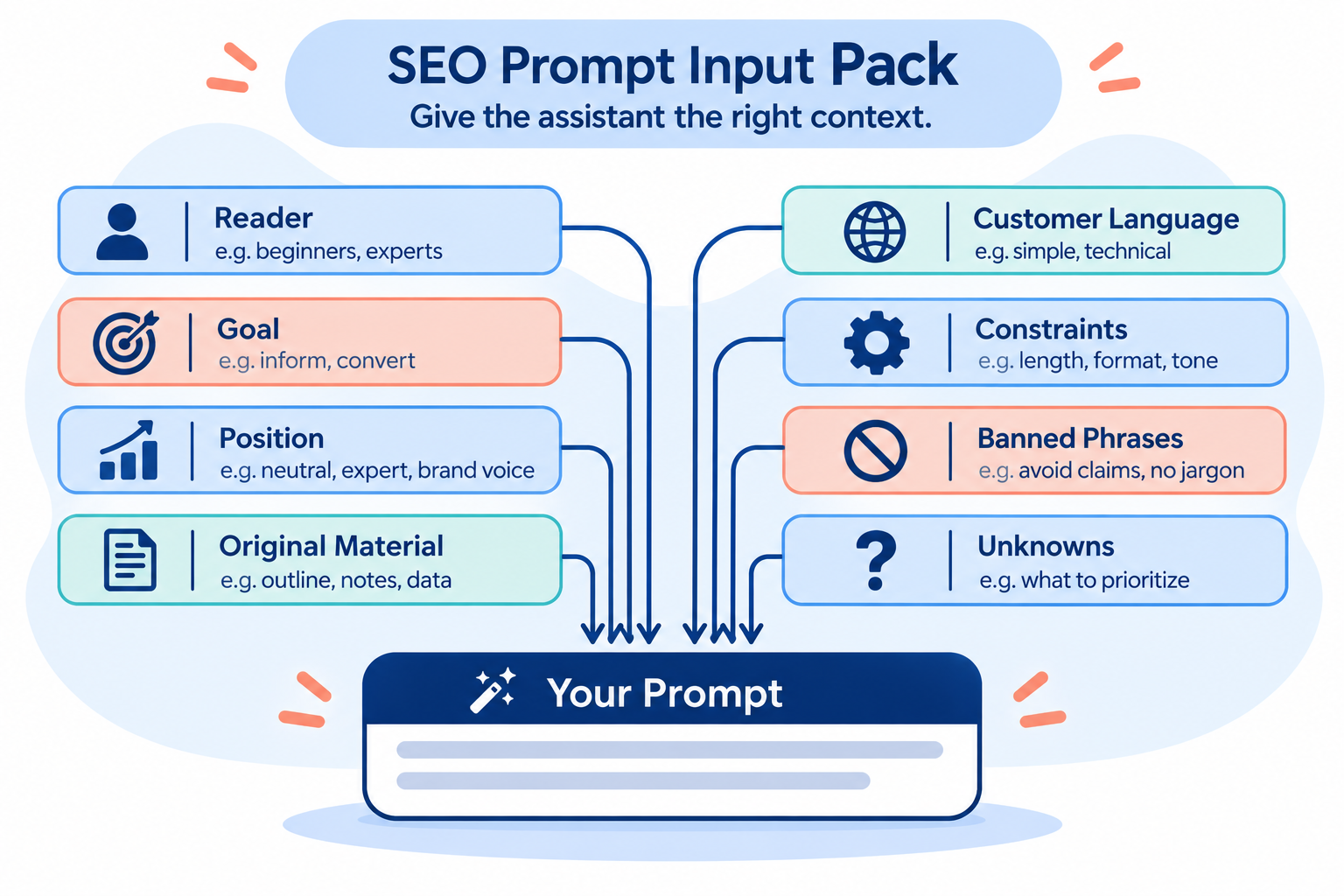
| Element | What to include | Example (placeholder) |
|---|---|---|
| Reader | Who they are, what they know, what they need | [Small business owner comparing options, no technical background] |
| Goal | What the page should help them do | [Choose between two services and know what to ask a provider] |
| Your position | Your thesis or opinion | [We recommend X for most small teams because of Y] |
| Original material | Data, examples, process notes, customer quotes with permission, photos described | [Our internal data for the period, with dates and sample size] |
| Customer language | Phrases real customers use | [Exact wording from support tickets] |
| Constraints | Things to avoid, tone, length, reading level | [No statistics beyond those supplied. Plain English.] |
| Banned phrases | Stock phrases you never want | [Phrases such as “in today’s fast-paced world”] |
| Unknowns | Things the model must not guess | [Prices, dates, legal claims] |
Notice that the pack contains no facts the model should supply. Everything comes from you. That is the point: the model’s job is organizing and expressing your material, and your material is what makes the page original. If you cannot fill in the original material row, the topic may not be one where you can add anything yet, and Google’s helpful content guidance asks exactly that question: does the content offer original information, reporting, research, or analysis?
Ten Tasks With Prompt Templates
The templates below are starting points. Replace the bracketed items, and adapt them to your account’s features. We have not tested outputs, so results will vary. Each one ends with a check.
Task 1: Find questions from your own conversations
Paste anonymized support tickets, chat logs, or sales call notes, with personal data removed.
Role: research assistant for a [type of business].
Below are [number] anonymized customer questions.
Group them by topic and intent (learn, compare, buy, fix).
For each group, list the three most common underlying questions in the customers’ own words.
Do not add questions that are not in the data.
Check: spot-check groups against the raw text, and count how many questions each group really contains.
Task 2: Cluster a keyword list
Export keywords and metrics from your keyword tool, then paste the keywords only.
Cluster these keywords by search intent and subtopic.
Name each cluster, state the likely intent, and suggest one page that could serve it.
Flag keywords that look like they belong on the same page and keywords that need separate pages.
Do not estimate volume or difficulty.
Check: look at the live results for a sample from each cluster to confirm intent. Merge clusters if the same pages rank for several.
Task 3: Analyze the gap in current results
Summarize the headings of the top few results yourself (do not paste full copyrighted text), and paste your own outline.
Here are the main headings used by [number] competing pages, and my outline.
List topics they cover that I do not, and topics I cover that they do not.
Do not suggest adding sections just to match them. Mark which gaps matter for a reader who wants to [goal].
Check: decide which gaps you can fill with something original. Skip gaps you can only fill with restated common knowledge.
Task 4: Draft a content brief
Using the input pack below, write a content brief with:
working title, reader, search intent, one-sentence thesis, outline with H2 and H3 headings,
for each section the question it answers and the evidence I must supply,
internal link targets from this list: [list], and open questions for the writer.
Use placeholders for any fact not in the pack.
Check: every “evidence I must supply” line should be something you can actually provide. If not, rethink the section.
Task 5: Draft a section from your notes
Write the section titled “[heading]” in plain English for [reader].
Use only the notes below. Open with a direct answer in one or two sentences.
Keep my wording where it is clear. Mark any claim you cannot support from the notes with [VERIFY].
Check: search the output for [VERIFY], confirm every fact against its source, and rewrite any sentence that could appear on any site.
Task 6: Make a draft less generic
Here is my draft. Do not rewrite it. Act as a critical editor.
List every sentence that is generic, could appear on any site, or makes a claim without evidence.
For each, ask me one specific question whose answer would improve it.
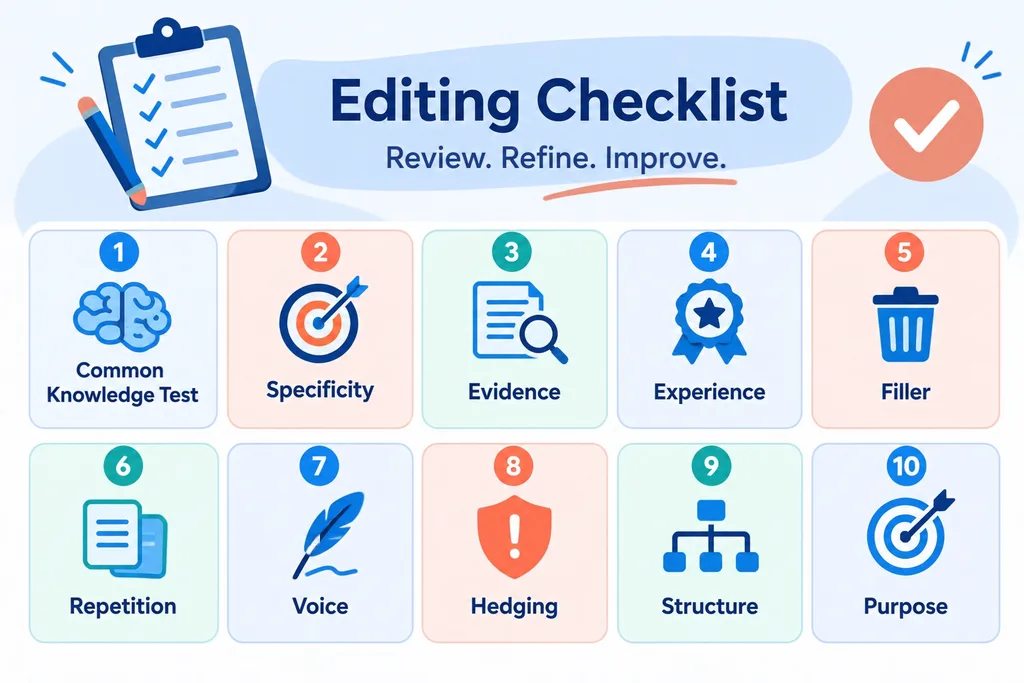
This reverses the usual flow. Instead of the model writing, it asks you for the specifics only you have, and you add them. Our guide to AI content optimization includes a fuller editing checklist.
Check: answer the questions with real details, then edit the draft yourself.
Task 7: Write title and meta description options
Suggest five title tags under 60 characters and three meta descriptions of 140 to 155 characters for this page.
Include the phrase “[primary keyword]” naturally. Describe the page accurately and do not promise results.
Page summary: [two sentences]
Check: count characters yourself, make sure each option matches the page, and avoid stuffing. Google advises reviewing titles and descriptions of AI-assisted pages, since they can appear in search results.
Task 8: Suggest FAQs
Based on this page text, suggest eight questions a reader may still have after reading.
Do not answer them yet. Mark which ones our page already answers.
Check: answer from your own knowledge and sources, and drop questions you cannot answer well. Suggested questions are not verified search queries.
Task 9: Draft structured data
Write JSON-LD for an Organization using only these facts: [name, url, logo url, sameAs urls].
Do not add properties for which I gave no data.
Check: validate with Google’s Rich Results Test, confirm the markup matches visible content, and remember that Google does not guarantee features that use structured data will appear.
Task 10: Build a technical helper
I have a CSV with columns [list]. Write a spreadsheet formula or a short Python script to [task, such as flag duplicate titles or map old URLs to new URLs by slug similarity].
Explain each step, and tell me how to test it on five rows first.
Check: run it on a small sample, compare with manual results, and keep a backup of your data. Never run scripts you do not understand on production systems.
Techniques That Keep Output Specific
| Technique | How to do it | Why it helps |
|---|---|---|
| Ask for questions first | Tell the model to ask you five clarifying questions before it writes | Surfaces missing specifics |
| Require placeholders | Say “use [VERIFY] or [NEED DATA] instead of guessing” | Reduces fabricated details |
| Limit sources | Say “use only the material below” | Keeps claims traceable |
| Ask for counterarguments | Ask what a skeptical expert would challenge | Adds depth and honesty |
| Use your own examples | Give a real case, with permission, and ask for structure around it | Makes content distinct |
| Ban stock phrases | List phrases to avoid and ask for a plain style | Reduces filler |
| Work in small pieces | Section by section, reviewing each | Errors do not compound |
| Critique, then revise | Ask for a critique of the draft against a checklist, then fix it yourself | Targets weak spots |
| Read it aloud | Final human pass | Catches robotic phrasing |
A before-and-after prompt (illustrative)
| Generic prompt | Grounded prompt |
|---|---|
| Write a blog post about choosing a CRM for small businesses. | Using the notes below from [N] customer calls, write the section “What small teams get wrong when choosing a CRM.” Reader: owner of a team of [size], no IT staff. Open with a direct answer. Use only the notes. Include the two real mistakes we saw: [mistake 1], [mistake 2]. Mark any claim not supported by the notes with [VERIFY]. Do not include statistics. |
The second prompt is longer, but the extra length is your material and your constraints, which is exactly where the originality comes from. The prompts are invented for illustration.
Accuracy: A Verification Habit
Because hallucinations are plausible, they are hard to spot by reading for style. Build verification into the process.
- Highlight every checkable claim (numbers, dates, names, quotes, laws, product specs).
- Trace each to a primary source you have opened yourself. If the model gave a source, open it and confirm it says what the draft claims. Do not assume that a provided link or citation is real.
- Remove anything you cannot confirm.
- Re-check metadata, alt text, and structured data. Google says these can appear in search and should be reviewed too.
- Have a second person check high-stakes pages. Use qualified professionals for health, legal, and financial topics.
For a fuller protocol, see our guide to AI content vs Human content
Data Privacy: What to Paste and What Not To
SEO work often involves client data. Before pasting anything into ChatGPT, check how your account handles it. OpenAI’s help page on data usage, privacy and security, as read for this article, says the following. The page showed no calendar date, so confirm the current wording.
| Topic | What the page says |
|---|---|
| Personal plans (Free, Plus, Pro) | Data sharing for model improvement is on by default. Turning off “Improve the model for everyone” means new conversations will not be used to train OpenAI models. |
| Business, Enterprise, Edu, and similar workspaces | By default, OpenAI does not use workspace content to train its models. The same applies to inputs and outputs through its API Platform. |
| Where the control lives | Settings, then Data controls. Signed-in choices apply across web and mobile. |
| Temporary Chat | Does not appear in history, does not create or update memories, and is not used to improve models. It may be retained up to 30 days for safety. |
| Retention | Turning off model training does not delete saved chats. Deleting content is a separate action. |
| Feedback | Submitting feedback such as a thumbs up or down may allow the whole conversation to be used for training, even if you have opted out. |
Practical rules that follow, which are our suggestions and not OpenAI’s:
- Do not paste personal data, passwords, API keys, unreleased financials, or client confidential material into any tool unless your agreement and settings allow it.
- Anonymize support tickets and call notes before pasting.
- Check your client contracts and your own policies before using AI tools on client material.
- Use workspace or business accounts where your organization has decided that is appropriate.
- Write down which account types the team may use for which data.
Staying Inside Google’s Guidelines
Using ChatGPT does not by itself break any Google rule. Google’s guidance says generative AI can help with research and structure, and that content should be reviewed and fact-checked. The concern is outcome and purpose.
| Do | Avoid |
|---|---|
| Use AI to research, outline, and edit, with human review | Generating many pages with little or no added value, which may violate the scaled content abuse policy |
| Add original information and first-hand experience | Rewording existing pages and calling them new |
| Show real authors and explain how content was made where readers would want to know | Invented authors, fake headshots, or false credentials |
| Fact-check and review titles, descriptions, alt text, and markup | Publishing model output unreviewed |
| Write for readers | Using AI mainly to manipulate rankings |
If you publish at volume, read Google’s scaled content abuse policy closely, and consider the scale questions in our AI Content Optimization guide. The Search Quality Rater Guidelines, as reported by Search Engine Land, tell raters to give the Lowest rating to pages whose main content is automated or AI-generated with little to no effort. Those guidelines do not directly affect ranking, though they show what Google considers low quality.
Building a Team Prompt Library
If several people use ChatGPT for SEO, a shared library prevents reinventing the wheel and keeps quality consistent.
| Library element | What to record |
|---|---|
| Prompt name and purpose | For example, “Keyword clustering v2” |
| Template text | The tested wording, with placeholders |
| Inputs required | What the user must supply |
| Known failure modes | For example, “tends to merge clusters that differ by intent” |
| Required checks | Who verifies what, and how |
| Data rules | What may and may not be pasted |
| Owner and review date | Who updates it, and when |
| Examples | One good and one bad output, redacted |
Version prompts, since model updates can change behavior. When output quality changes, check whether the prompt or the model changed before blaming either.
Measuring Whether It Helps
Judge ChatGPT by results on tasks, not by how it feels. Track a few simple measures.
| Measure | How to track | What it tells you |
|---|---|---|
| Time per task, before and after | Time logs | Whether it saves effort |
| Errors found in review | Your review log | Quality cost of each task type |
| Edit distance or rework time | Compare draft to final | How much of the output survives |
| Page performance over time | Search Console and analytics | Whether pages earn visibility and conversions |
| Reader feedback | Comments, support, sales notes | Whether pages are useful |
| Citation and mention in prompt tests | Dated prompt audits | AI search visibility |
Compare tasks, such as brief writing and meta drafting, separately, since the value differs a lot between them. For visibility measures, see our guide to the KPIs marketers should track.
Common Mistakes
- Asking for a finished article. It produces the average, and the average is generic.
- Asking for keyword volume or difficulty. It does not measure them, so any numbers are unreliable.
- Trusting citations and statistics. Open the source yourself.
- Pasting confidential data. Check settings and agreements first.
- Copying competitor text into prompts. Summarize ideas and respect copyright.
- Skipping the human edit. Voice, evidence, and judgment come from you.
- Publishing at scale. Many low-value pages invite policy problems.
- Using prompts you never test. Try them on small samples and keep what works.
- Expecting guarantees. No prompt ensures rankings or citations.
A 30-Day Plan
Week 1: Rules and inputs
Write a one-page policy on allowed tasks, data rules, and checks. Build an input pack template for your main content types.
Week 2: Pilot three tasks
Choose three low-risk tasks, such as clustering, briefs, and meta options. Run them with the templates and log time and errors.
Week 3: Add one content task
Use the critique prompt on two existing drafts, answer the questions with real details, and edit. Fact-check every claim.
Week 4: Review and document
Compare time and quality with your usual process. Keep the prompts that helped, drop the ones that did not, and record them in your library with known failure modes.
Worked Example (Illustrative)
This is a hypothetical scenario, not a case study. A small accounting firm wants a guide on year-end tax preparation. Its first attempt, “write a 1,500 word guide to year-end tax prep,” returns a tidy list of tips that match every other guide. Two figures cannot be traced to any source.
The firm switches methods. It anonymizes 40 client questions from the past season and asks ChatGPT to group them by topic and intent. It adds its own checklist, three real mistakes it sees every year (with client details removed), and the current official thresholds, copied from the tax authority’s website with the link recorded. It asks for a brief with sections, the evidence each section needs, and placeholders for anything unsupplied.
An accountant writes the key sections, uses ChatGPT to tighten the language and to critique the draft, and answers its questions with specifics. Every figure is checked against the official source, and a reviewer signs off. The page gets a byline, a review line, and a short note on how AI was used. The firm tracks time saved, errors found, and performance, and makes no promise about rankings.
What Is Still Uncertain
- How ChatGPT’s behavior will change with new models. Prompts that work now may need revising.
- Which tasks will become reliable enough to trust with lighter checks. Verify as before until you have evidence.
- How Google and AI search tools will treat AI-assisted content as it becomes more common. The documents we read describe principles, not detection methods.
- What exactly your account settings cover. OpenAI’s page was undated, so confirm current terms.
- How much time AI saves in your specific workflow. Measure it.
Stay flexible, keep notes, and test.
Frequently Asked Questions
Can ChatGPT do SEO for me?
It can help with parts of SEO work, such as brainstorming, clustering, outlines, editing, and technical helpers, but it cannot measure rankings or search volume, and it can state false things confidently. A person has to supply the facts, check the output, and own the result.
Can ChatGPT do keyword research?
It can help organize and cluster a keyword list you paste in, and suggest related questions, but it does not measure search volume, difficulty, or rankings. Get those from keyword tools and Search Console, and verify intent in the live results.
How do I stop ChatGPT content sounding generic?
Give it narrow jobs and your own material: customer questions, data, examples, and constraints. Ask it to critique and to ask you questions, then add the specifics yourself. Do not ask it for a finished article from a one-line prompt.
Will Google penalize ChatGPT content?
Google’s guidance says AI can help with research and structure, and that producing many pages with AI without adding value may violate its scaled content abuse policy. The focus is value, accuracy, and purpose, not the tool. No outcome is guaranteed.
Is it safe to paste client data into ChatGPT?
It depends on your plan, settings, and agreements. OpenAI says personal plans share data for model improvement by default unless you turn the setting off, while business workspaces are not used for training by default. Anonymize data and follow your contracts.
Can I trust the sources ChatGPT gives me?
Not without checking. OpenAI describes hallucinations as plausible but false statements. Open every source yourself and confirm that it says what the draft claims.
What is the best first task to try?
Try a low-risk task where you can easily judge the result, such as clustering a keyword list, drafting a brief from your own notes, or asking the model to critique your draft.
Do I need to disclose that I used ChatGPT?
Google suggests explaining how content was created where readers would reasonably want to know. It does not prescribe a format. Be honest and consistent.
Conclusion
ChatGPT is useful for SEO when you treat it as an assistant with narrow jobs and your own material. It is a poor choice as a source of facts, metrics, or finished articles. Generic output is mostly a symptom of generic input, and the fix is to bring the specifics only you have: customer questions, data, experience, and judgment.
Start small. Build an input pack, try three low-risk tasks, verify everything, protect your data, and log what you learn. Keep the human parts human: the thesis, the evidence, the edit, and the accountability. That approach saves time without trading away the qualities that make a page worth reading, and no approach can promise rankings or citations.
Next step: See our guide on Semantic SEO.
References:
- OpenAI: Why language models hallucinate
- OpenAI Help Center: Data usage, privacy and security
- Google Search Central: Guidance on using generative AI content
- Google Search Central: Spam policies for Google web search
- Google Search Central: Creating helpful, reliable, people-first content
- Search Engine Land: Google quality raters and AI-generated content